
Signal processing
mlpack provides several signal processing techniques that allows to extract features from stationary and non-stationary signals:
- Decomposition:
- Feature Extraction:
🔗 EMD
mlpack provides Empirical Mode Decomposition (EMD) to process signals
for training and testing. This can be used for signal monitoring pipelines
in nonlinear and nonstationary problems.
The EMD() function can be used to extract Intrinsic Mode Functions (IMFs)
from a uniformly sampled periodic signal:
EMD(signal, imfs, residue, maxImfs = 10, maxSiftIter = 50, tol = 1e-3)-
signalis a column vector containing the 1D signal data (e.g.arma::vec); the sequence must be uniformly sampled. -
imfsis a matrix that will be modified to contain the extracted IMFs. It will have shapeN x K, whereNis the length ofsignalandKis the number of extracted IMFs. -
residueis a column vector (of lengthN) that will be modified to contain the final residual signal after extracting the IMFs. -
maxImfs(of typesize_t) is the maximum number of IMFs to extract. -
maxSiftIter(of typesize_t) is the maximum sifting iterations per IMF. -
tol(double) is the stopping tolerance used on sifting iterations.
NOTES:
-
The original signal can be reconstructed as the sum of the IMFs and residue.
-
The stopping criterion is based on the normalized mean envelope magnitude.
-
Sifting will terminate when zero-crossings and extrema are equal or differing by at most one. Specifically, the S-number is set to S=1.
-
A smaller tolerance sets a stricter stopping criterion. The algorithm will terminate when either
maxSiftIteris reached or thetolis satisfied, whichever occurs first.
-
The figures below show the signal decomposition process with EMD:
-
(a) original signal;
-
(b) original signal with envelopes about the local minima and maxima;
-
(c) the first IMF extracted from the original signal via sifting.
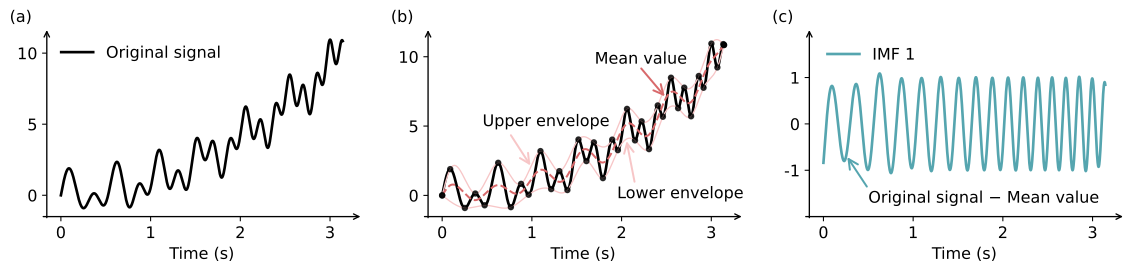
Example using EMD on a time-varying signal S.
const arma::uword N = 400;
const double tMin = 0.0;
const double tMax = arma::datum::pi;
arma::vec time = arma::linspace(tMin, tMax, N);

// signal = sin(20*T*(1 + 0.2*T)) + T**2 + sin(13*T)
// see figure above
arma::vec signal =
    arma::sin( 20.0 * time % (1.0 + 0.2 * time) ) +
    arma::square(time) + arma::sin(13.0 * time);

arma::mat imfs;
arma::vec residue;

// Use up to 5 IMFs, 50 sifts per IMF, tol = 1e-6
mlpack::EMD(signal, imfs, residue, 5, 50, 5e-6);

// Print dominant frequency for the first 3 IMFs
// to check if EMD is extracting the correct IMFs
const size_t numToShow = std::min<size_t>(3, imfs.n_cols);
const double dt = time(1) - time(0);
const double fs = 1.0 / dt;
for (size_t k = 0; k < numToShow; ++k)
{
  arma::cx_vec spectrum = arma::fft(imfs.col(k));
  // Use only the first half of the spectrum
  arma::vec mag = arma::abs(spectrum.rows(0, spectrum.n_elem / 2));
  arma::uword idx = mag.index_max();
  const double peakHz = (double) idx * fs / spectrum.n_elem;
  std::cout << "IMF " << k << " peak freq: " << peakHz << " Hz" << std::endl;
}
See also:
- Empirical Mode Decomposition on Wikipedia
- EMD for nonlinear and non-stationary time series analysis (original EMD paper)
🔗 EEMD
The EEMD() function wraps EMD() to produce more robust IMFs
by running EMD many times on the signal with independent white noise added
to each trial, then averaging the results. The added noise reduces mode mixing
and cancels out in the average.
-
EEMD(signal, imfs, residue, ensSize = 100, noiseStrength = 0.2, maxImfs = 10, maxSiftIter = 50, tol = 1e-3)-
ensSize(of typesize_t) is the number of members in the ensemble (that is the number ofEMD()runs to be averaged). -
noiseStrength(of typedouble) is the fraction of the signal standard deviation used as the standard deviation of the added white noise in eachEMD()run (i.e. 0.1 means 10% of signal standard deviation). -
signal,imfs,residue,maxImfs,maxSiftIter, andtolare defined in the classicalEMD()implementation.
NOTES:
-
The original signal cannot be reconstructed as the sum of the IMFs and residue, as in
EMD(). -
Number of extracted IMFs will be the minimum number of IMFs extracted by by
EMD()across allensSizeruns (<=maxImfs). -
EEMD may produce low-energy leading IMFs due to injected noise and ensemble averaging. Depending on the application, users may want to discard negligible IMFs in post-processing (e.g., using an energy-fraction threshold).
-
The number of returned IMFs is bounded between
0andmaxImfs. The algorithm returns only as many IMFs as can actually be extracted from the input signal.
-
Example using EEMD on a time-varying signal S (shown in above EMD figure).
const arma::uword N = 3000;
const double tMin = 0.0;
const double tMax = arma::datum::pi;
arma::vec time = arma::linspace(tMin, tMax, N);

// signal = sin(20*T*(1 + 0.2*T)) + T**2 + sin(13*T)
// see figure above in the EMD documentation
arma::vec signal =
    arma::sin( 20.0 * time % (1.0 + 0.2 * time) ) +
    arma::square(time) + arma::sin(13.0 * time);

arma::mat imfs;
arma::vec residue;

// Use 100 ensemble members, 0.15 noise strength, 10 IMFs, 50 sifts per IMF, tol = 1e-2
mlpack::EEMD(signal, imfs, residue, 100, 0.15, 10, 50, 1e-2);
See also:
- Ensemble Empirical Mode Decomposition (original EEMD paper)
- EMD for nonlinear and non-stationary time series analysis (original EMD paper)
🔗 MFE
mlpack provides the MFE() function to extract standard audio
features from raw PCM data loaded with Load(). These features can be
used as input to machine learning models for speech recognition, speaker identification,
keyword spotting, and other tasks.
-
MFE(signals, mfe, sampleRate, numMelFilters=40, windowLength=25, windowStep=10, nFFT=0, lowFreq=0.0, highFreq=0.0)-
Extract log-Mel filterbank energies from windows of audio in
signals, storing the result inmfe. signalsshould be a matrix with floating-point elements and shapenumSamplesxnumSignals, andmfewill be set to shapenumMelFiltersx(numWindows * numSignals).- To perform
MFE()on non-floating point audio signals, first convert the data to a floating-point matrix type (e.g. usingarma::conv_to).
- To perform
sampleRatecan be set using the members of anAudioOptionspopulated during a call toLoad().
NOTES:
- If the audio signal has multiple channels, the channels must be
de-interleaved before calling
MFE()with each column representing a separate channel. This preserves spatial information (e.g., which sounds come from the left vs. right). If spatial information is not needed, the channels can be mixed down to mono before processing (e.g.,mono = (left + right) / 2).
-
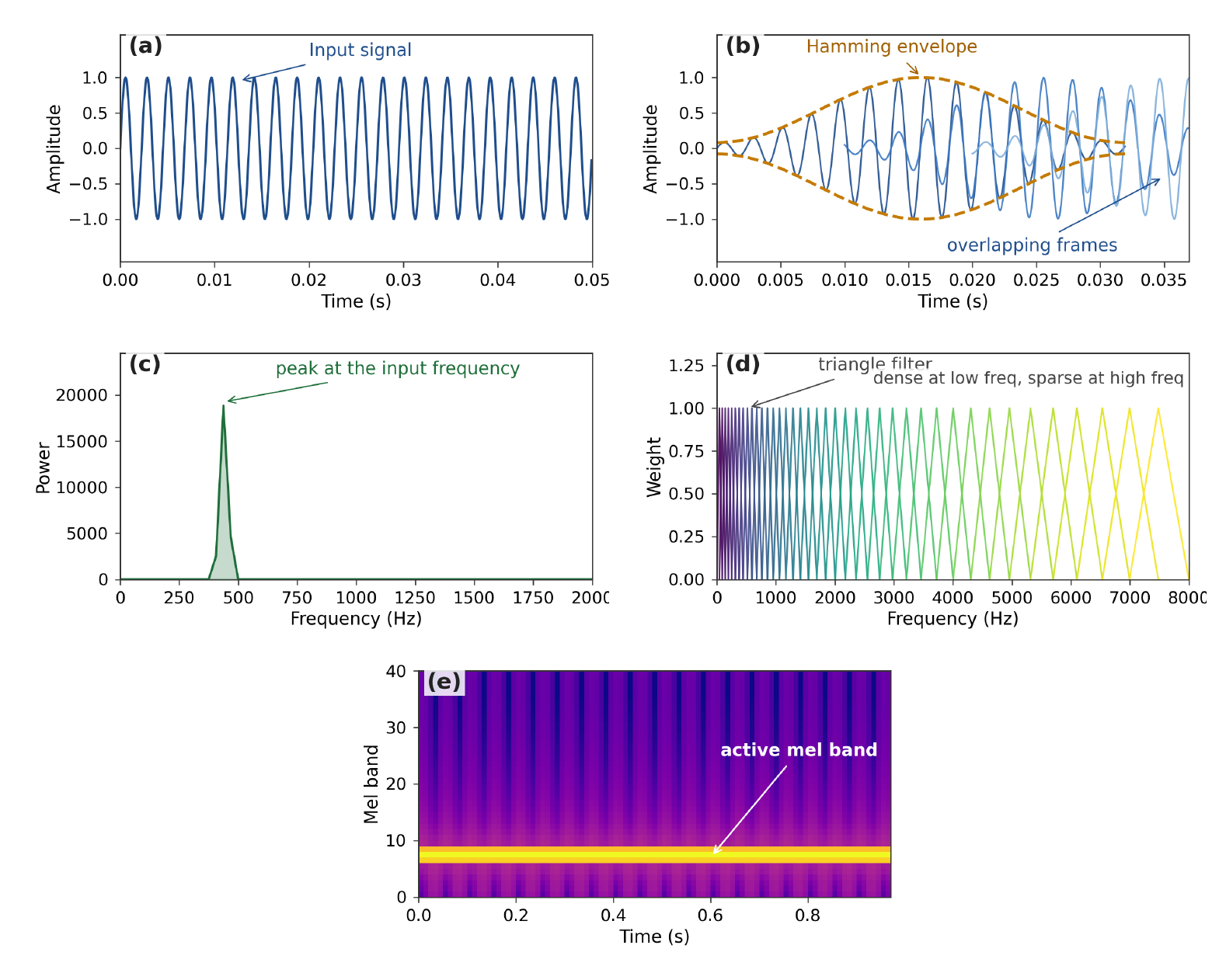
MFE is computed using the following steps. The figure below shows the application of MFE to a 440 Hz sine wave signal.
- (a) Each individual input signal should have amplitude in the range
[-1.0, 1.0]. - (b) Cut the signal into overlapping frames tapered by a Hamming window to prevent spectral leakage.
- (c) Apply the Short-Time Fourier Transform (STFT) to each data window to produce a short-term spectrum.
- (d) Multiply each STFT frame with the Mel filterbank, which consists of log-spaced triangular filters.
- (e) Take the log of the filter bins to produce the Mel filter energies.
Function Parameters:
| name | type | default | description |
|---|---|---|---|
signals |
arma::mat or other floating-point matrix |
(n/a) | Raw PCM audio samples. |
mfe |
arma::mat or other floating point matrix |
(n/a) | Output matrix of shape (numMelFilters x numWindows). |
sampleRate |
size_t |
(n/a) | Sample rate of the audio in Hz (e.g. 16000, 44100). |
numMelFilters |
size_t |
40 |
Number of Mel-spaced triangular filters. Typical range (20 to 100) |
windowLength |
float |
25.0 |
Window length in milliseconds. Typical range 20 to 40. |
windowStep |
float |
10.0 |
Window hop (step) in milliseconds. Typical range 5 to 20. |
nFFT |
size_t |
0 |
FFT size; 0 will use the next power of 2 greater than or equal to the window length. Powers of 2 are more efficient. Typical range 256 to 4096. |
lowFreq |
float |
0.0 |
Low frequency bound for the Mel filterbank in Hz. Typical range 0 to 300. |
highFreq |
float |
0.0 |
High frequency bound in Hz; 0 means sampleRate / 2. Typical range 4000 to sampleRate / 2. |
Apply MFE filter with default parameters on voice signals:
// See https://datasets.mlpack.org/sine.wav
arma::mat signal;
mlpack::AudioOptions opts = mlpack::Fatal + mlpack::WAV;
mlpack::Load("sine.wav", signal, opts);

arma::mat mfe;
mlpack::MFE(signal, mfe, opts.SampleRate());

std::cout << "MFE shape: " << mfe.n_rows << " x " << mfe.n_cols << std::endl;
Specifying a custom number of Mel filters and frequency range:
// See https://datasets.mlpack.org/sine.wav
arma::fmat signal;
mlpack::AudioOptions opts = mlpack::Fatal + mlpack::WAV;
mlpack::Load("sine.wav", signal, opts);

arma::fmat mfe;
// 80 mel filters, default window size, frequency range 300–8000 Hz.
mlpack::MFE(signal, mfe, opts.SampleRate(), 80, 25.0, 10.0, 0, 300.0,
    8000.0);

std::cout << "MFE shape: " << mfe.n_rows << " x " << mfe.n_cols
        << " (filters x windows)" << std::endl;
A detailed example showing the average extracted energy per frequency bin:
arma::mat signal;
mlpack::AudioOptions opts = mlpack::Fatal + mlpack::WAV;
mlpack::Load("sine.wav", signal, opts);

std::cout << "Loaded: " << signal.n_rows << " samples, "
  << opts.SampleRate() << " Hz, "
  << opts.Channels() << " channel(s)." << std::endl;

arma::mat mfe;
mlpack::MFE(signal, mfe, opts.SampleRate());

std::cout << "MFE shape: " << mfe.n_rows << " x " << mfe.n_cols
        << " (filters x windows)." << std::endl;

arma::vec meanMFE = arma::mean(mfe, 1);

size_t peakFilter = meanMFE.index_max();
float peakVal = meanMFE.max();

size_t nFFT = 512;
float highFreq = opts.SampleRate() / 2.0f;
float melLow = mlpack::HzToMel(0.0f);
float melHigh = mlpack::HzToMel(highFreq);
arma::vec melPoints = arma::linspace<arma::vec>(melLow, melHigh, 42);
arma::vec hzPoints(42);
for (size_t i = 0; i < 42; ++i)
hzPoints(i) = mlpack::MelToHz(melPoints(i));

std::cout << std::endl;
std::cout << "Filter   Freq range (Hz)       Avg energy" << std::endl;
std::cout << "------   -------------------   ----------" << std::endl;

for (size_t i = 0; i < 40; ++i)
{
  std::cout << "  " << std::setw(2) << i << "     "
            << std::setw(5) << std::fixed << std::setprecision(0)
            << hzPoints(i) << " – "
            << std::setw(5) << hzPoints(i + 2) << "       "
            << std::setw(8) << std::setprecision(2) << meanMFE(i);

  if (i == peakFilter)
    std::cout << "   <<< peak";
  else if (i == peakFilter - 1 || i == peakFilter + 1)
    std::cout << "   <<< adjacent";

  std::cout << std::endl;
}
🔗 MFCC
mlpack provides the MFCC() function to extract standard audio
features from raw PCM data loaded with Load(). Similar to MFE, MFCC
output can be used as input to machine learning models. Note that, since MFCC
coefficients are decorrelated, they can be used with distance-based
machine learning algorithms (e.g., KNN,
KMeans) or probabilistic algorithms
(e.g., GMM,
HMM).
-
MFCC(signals, mfcc, sampleRate, numCoeffs, numMelFilters=40, windowLength=25, windowStep=10, nFFT=0, lowFreq=0.0, highFreq=0.0)-
Extract Mel-Frequency Cepstral Coefficients from windows of audio in
signals, storing the result inmfcc. signalsshould be a matrix with floating-point elements and shapenumSamplesxnumSignals, andmfccwill be set to shapenumCoeffsx(numWindows * numSignals).- To perform
MFE()on non-floating point audio signals, first convert the data to a floating-point matrix type (e.g. usingarma::conv_to).
- To perform
sampleRatecan be set using the members of anAudioOptionspopulated during a call toLoad().
NOTES:
-
If the audio signal has multiple channels, the channels must be de-interleaved before calling
MFCC()with each column representing a separate channel. This preserves spatial information (e.g., which sounds come from the left vs. right). If spatial information is not needed, the channels can be mixed down to mono before processing (e.g.,mono = (left + right) / 2). -
numCoeffsmust be less than or equal tonumMelFilters. The DCT compressesnumMelFilterslog-mel energies down tonumCoeffscepstral coefficients; it cannot produce more coefficients than there are input values.
-
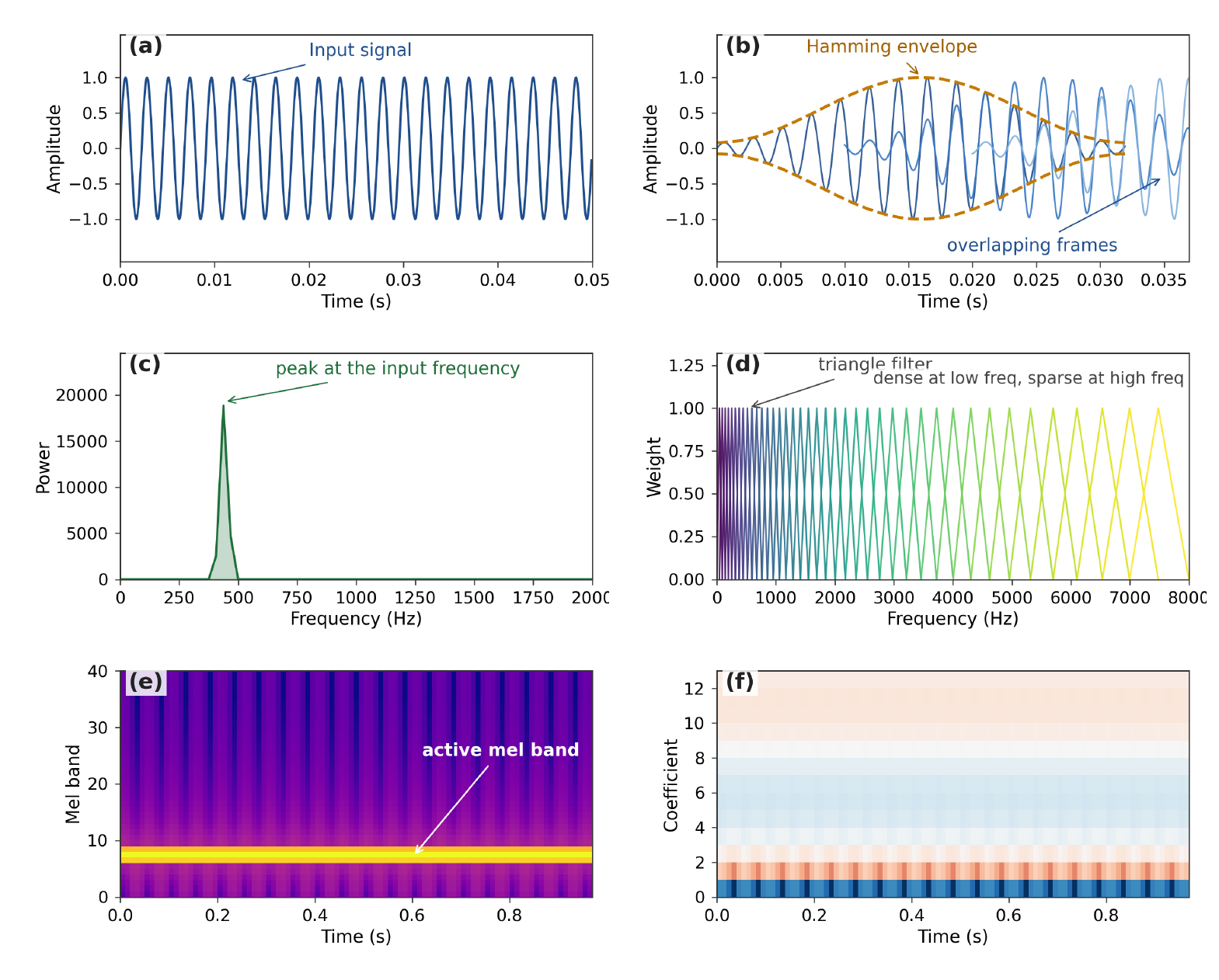
MFCC is computed using the following steps. The figure below shows the application of MFCC to a 440 Hz sine wave signal.
- (a) Each individual input signal should have amplitude in the range
[-1.0, 1.0]. - (b) Cut the signal into overlapping frames tapered by a Hamming window to prevent spectral leakage.
- (c) Apply the Short-Time Fourier Transform (STFT) to each data window to produce a short-term spectrum.
- (d) Multiply each STFT frame with the Mel filterbank, which consists of log-spaced triangular filters.
- (e) Take the log of the filter bins to produce the Mel filter energies.
- (f) Multiplying by a discrete cosine transform (DCT) matrix gives MFCC.
Function Parameters:
| name | type | default | description |
|---|---|---|---|
signals |
arma::mat or other floating-point matrix |
(n/a) | Raw PCM audio samples. |
mfcc |
arma::mat or other floating point matrix |
(n/a) | Output matrix of shape (numMelFilters x numWindows). |
sampleRate |
size_t |
(n/a) | Sample rate of the audio in Hz (e.g. 16000, 44100). |
numCoeff |
size_t |
(n/a) | Number of cepstral coefficients. |
numMelFilters |
size_t |
40 |
Number of Mel-spaced triangular filters. Typical range 20 to 100. |
windowLength |
float |
25.0 |
Window length in milliseconds. Typical range 20 to 40. |
windowStep |
float |
10.0 |
Window hop (step) in milliseconds. Typical range 5 to 20. |
nFFT |
size_t |
0 |
FFT size; 0 will use the next power of 2 greater than or equal to the window length. Powers of 2 are more efficient. Typical range 256 to 4096. |
lowFreq |
float |
0.0 |
Low frequency bound for the Mel filterbank in Hz. Typical range 0 to 300. |
highFreq |
float |
0.0 |
High frequency bound in Hz; 0 means sampleRate / 2. Typical range 4000 to sampleRate / 2. |
Extract 13 MFCCs from a WAV file.
// See https://datasets.mlpack.org/sine.wav
arma::mat signal;
mlpack::AudioOptions opts = mlpack::Fatal + mlpack::WAV;
mlpack::Load("sine.wav", signal, opts);

arma::mat mfcc;
mlpack::MFCC(signal, mfcc, opts.SampleRate());

// mfcc has a shape of 13 x numWindows.
std::cout << "MFCC shape: " << mfcc.n_rows << " x " << mfcc.n_cols
    << "." << std::endl;
Extract 20 MFCCs with 80 Mel filters from an MP3 file:
// See https://datasets.mlpack.org/fifths.mp3
arma::fmat signal;
mlpack::AudioOptions opts = mlpack::Fatal + mlpack::MP3;
mlpack::Load("fifths.mp3", signal, opts);

arma::fmat mfcc;
mlpack::MFCC(signal, mfcc, opts.SampleRate(), 20, 80);
MFCC with custom parameters:
// See https://datasets.mlpack.org/sine.wav
arma::fmat signal;
mlpack::AudioOptions opts = mlpack::Fatal + mlpack::WAV;
mlpack::Load("sine.wav", signal, opts);

arma::fmat mfcc;
mlpack::MFCC(signal, mfcc, opts.SampleRate(), 13, 26, 25.0, 10.0, 0, 300.0,
    3400.0);
Analyse the 13 MFCC coefficients extracted from loading a sine wav signal and what each one captures:
arma::mat signal;
mlpack::AudioOptions opts = mlpack::Fatal + mlpack::WAV;
mlpack::Load("sine.wav", signal, opts);

std::cout << "Loaded: " << signal.n_rows << " samples, "
  << opts.SampleRate() << " Hz, "
  << opts.Channels() << " channel(s)." << std::endl;

arma::mat mfcc;
mlpack::MFCC(signal, mfcc, opts.SampleRate());

std::cout << "MFCC shape: " << mfcc.n_rows << " x " << mfcc.n_cols
  << " (coefficients x windows)." << std::endl;

arma::vec meanMFCC = arma::mean(mfcc, 1);

std::cout << std::endl;
std::cout << "Coeff   Avg value    What it captures (roughly)" << std::endl;
std::cout << "-----   ---------    ----------------" << std::endl;

const char* descriptions[] = {
    "Overall energy (loudness)",
    "Spectral tilt (low vs high freq balance)",
    "Spectral curvature (middle vs edges)",
    "Two-bump structure (formant separation)",
    "Finer spectral shape",
    "Finer spectral shape",
    "Finer spectral shape",
    "Finer spectral shape",
    "Finer spectral shape",
    "Finer spectral shape",
    "Finer spectral shape",
    "Fine spectral detail",
    "Finest spectral detail"
};

for (size_t i = 0; i < mfcc.n_rows; ++i)
{
  std::cout << "c[" << std::setw(2) << i << "]  "
      << std::setw(10) << std::fixed << std::setprecision(2) << meanMFCC(i)
      << "    " << descriptions[i] << std::endl;
}