
🔗 YOLOv3 and YOLOv3Tiny
The YOLOv3 and YOLOv3Tiny classes implement the models from
the paper “YOLOv3: An Incremental Improvement”. YOLOv3 is a simple
object detection algorithm that takes in an image and predicts multiple bounding
boxes in a single forward pass of the neural network.
NOTE: At the current time, only prediction is supported by the YOLOv3
and YOLOv3Tiny classes. Support for training and fine-tuning is in progress.
Simple usage example:
NOTE: You must define the MLPACK_ENABLE_ANN_SERIALIZATION macro
to load a YOLOv3 model from disk.
// Download: https://models.mlpack.org/yolo/yolov3-320-coco-f64.bin
mlpack::YOLOv3 model;
mlpack::Load("yolov3-320-coco-f64.bin", model);

// Download: https://models.mlpack.org/yolo/dog.jpg
arma::mat inputImage, outputImage;
mlpack::ImageOptions opts;
mlpack::Load("dog.jpg", inputImage, opts);

// Preprocess the `inputImage`, predict bounding boxes using `YOLOv3`
// and draw them onto `outputImage`.
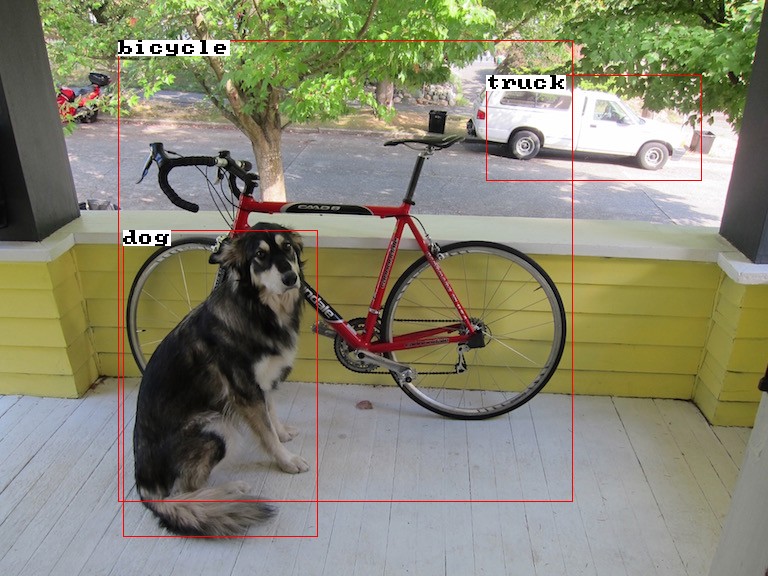
model.Predict(inputImage, opts, outputImage, true);

// Save to "output.jpg".
mlpack::Save("output.jpg", outputImage, opts);
Quick Links:
- Constructors: create
YOLOv3objects. Predict(): predict bounding boxes in an image.- Other functionality for loading, saving, and inspecting the model.
YOLOv3Tinyclass for efficient low-resource detection.- Pretrained weights for different YOLO models.
- Examples of simple usage and links to detailed example projects.
- Template parameters for custom behavior.
See also:
- Object Detection on Wikipedia
- You Only Look Once (original YOLO paper)
- YOLOv3 paper where the YOLOv3 architecture is described.
DAGNetworkis used internally to represent the model.LetterboxImages()is used to make the input image square but retain the aspect ratio of the original image.GroupChannels()is used to group the image channels for the convolutional layers.
🔗 Constructors
Construct a YOLOv3 object using one of the constructors below.
Defaults and types are detailed in the
model = YOLOv3()- Create an uninitialized YOLOv3 model.
- After this step, load pretrained weights into the
model with
Load().
🔗 Predicting Bounding Boxes
Once the weights are loaded, you can compute likely object bounding boxes with with Predict().
model.Predict(image, opts, output, drawBoxes=false, ignoreThresh=0.7)- Predict objects in the given
image(with metadataopts). - Predict will apply a letterbox transform to
image. Image pixel values are expected to be between 0-255. - If
drawBoxesis true,outputwill be a copy of image with the bounding boxes from the model drawn onto it. - Bounding boxes will be drawn if their confidence is greater than
ignoreThresh. - If
drawBoxesis false, the output will be the raw outputs of the model. The bounding box coordinates will be in the original image’s space.- The format of the
outputmatrix is described in the documentation for the next overload, below.
- The format of the
- Predict objects in the given
| name | type | description | default |
|---|---|---|---|
image |
arma::mat |
Input image. | n/a |
opts |
ImageOptions |
Image metadata. | n/a |
output |
arma::mat |
Output: either an output image with bounding boxes or raw outputs of the model, depending on drawBoxes. |
n/a |
drawBoxes |
bool |
If true, copy image to output and draw bounding boxes; otherwise, simply return raw bounding boxes and class probabilities in output. |
false |
ignoreThreshold |
double |
Minimum confidence to have the corresponding bounding box drawn onto output, if drawBoxes is true. |
0.7 |
model.Predict(preprocessedInput, rawOutput)- Takes in a manually preprocessed image. See example.
rawOutputstores the raw detection data. The shape of the output matrix will be(numAttributes * numBoxes, preprocessedInput.n_cols).- Each bounding box is made up of
numAttributeselements:cx,cy,w,h, the objectness score, and class probabilities for each class.cxandcyare the coordinates for the center of the bounding box.wandhare respectively the width and height of the bounding box.- Objectness represents how likely an object is in the given box (
0to1). - The class probability represents the conditional probability that an object is of a particular class given that there is an object in the box.
numAttributescan be obtained frommodel.NumAttributes().numBoxesdepends on the model size and can be obtained frommodel.NumBoxes(). See the pretrained weights section for more info.- So, e.g.,
output(j * numAttributes + (5 + i), k)obtains the class probability of theith class in thejth bounding box of thekth image inpreprocessedInput. See examples for usage samples.
| name | type | description |
|---|---|---|
input |
MatType |
Input image. See example for details on preprocessing the input image |
output |
MatType |
Raw outputs of the model |
🔗 Other Functionality
-
YOLOv3can be serialized withSave()andLoad(). -
Model()will return the underlyingDAGNetworkobject that represents the model architecture. -
ImageSize()will return asize_tcontaining the expected width and height of the image after preprocessing. Theyolov3-320-coco-f64.binmodel for example takes in an image where the width and height are320pixels. -
NumClasses()will return asize_tindicating the number of classes that a bounding box could contain. For example, the pretrained weights were trained on the COCO dataset, which includes 80 different classes. -
ClassNames()will return a vector of strings (std::vector<std::string>), each being the name of a class the model can predict. You can find all the COCO names in order here. -
Anchors()returns a vector of doubles (std::vector<double>) representing the anchors used during inference. -
NumBoxes()returns asize_tindicating the number of possible bounding boxes the model can detect.
🔗 YOLOv3Tiny
YOLOv3Tiny is a smaller object detection model based off of YOLOv3 but for
low-resource machines. YOLOv3Tiny has an identical API to YOLOv3 so it can
be used as a drop-in replacement. YOLOv3 has ~60 million parameters, while
YOLOv3Tiny has ~8 million.
Pretrained weights are also included for YOLOv3Tiny.
Simple example usage of YOLOv3Tiny
// Step 1: load the pretrained `YOLOv3Tiny` weights.
// Download: https://models.mlpack.org/yolo/yolov3-tiny-416-coco-f64.bin
mlpack::YOLOv3Tiny model;
mlpack::Load("yolov3-tiny-416-coco-f64.bin", model);

// Step 2: load the image.
// Download: https://models.mlpack.org/yolo/dog.jpg
arma::mat image, outputImage;
mlpack::ImageOptions opts;
mlpack::Load("dog.jpg", image, opts);

// Step 3: Preprocess the input image, detect bounding boxes and
// draw them onto `outputImage`.
model.Predict(image, opts, outputImage, true);

// Step 4: Save to "output.jpg".
mlpack::Save("output.jpg", outputImage, opts, true);
🔗 Pretrained weights
Because training a YOLOv3 model from scratch is time-consuming,
a number of pretrained models are available for download.
The pretrained weights were trained on the COCO dataset.
- COCO dataset was used to train the pretrained weights included.
- COCO class names in their correct order.
The format for the name of each YOLOv3 pretrained model is
<model name>-<image size>-<finetuned dataset name>-<matrix type>.bin.
yolov3-320-coco-f64.binyolov3-416-coco-f64.binyolov3-608-coco-f64.binyolov3-tiny-416-coco-f64.bin
arma::fmat weights (e.g 32-bit precision) are also available. These weights need custom template behaviour.
yolov3-320-coco-f32.binyolov3-416-coco-f32.binyolov3-608-coco-f32.binyolov3-tiny-416-coco-f32.bin
An increased image size means the model will be able to better detect smaller objects at the cost of speed. Similarly, smaller matrix types allow for faster loading of models and faster inference times.
When using YOLOv3, different image sizes will affect how many possible boxes
the model can output. For example, yolov3-320-coco-f64.bin will output 6300 possible boxes.
Below is a table with all the pretrained models and how many possible boxes
they output.
| Model | Image Size | Number of Boxes |
|---|---|---|
yolov3 |
320 |
6300 |
yolov3 |
416 |
10647 |
yolov3 |
608 |
22743 |
yolov3-tiny |
416 |
2535 |
The pretrained models available were all finetuned on the COCO dataset. A link to all the COCO class names is available too.
🔗 Simple Examples
See also the simple usage example for a trivial usage
of the YOLOv3 class.
NOTE: You must define the MLPACK_ENABLE_ANN_SERIALIZATION macro
to serialize and deserialize models that use arma::mat as the data type.
Simple example loading the image, passing it to Predict() and saving the output.
// Step 1: load the pretrained weights.
// Download: https://models.mlpack.org/yolo/yolov3-320-coco-f64.bin
mlpack::YOLOv3 model;
mlpack::Load("yolov3-320-coco-f64.bin", model);

// Step 2: load the image.
// Download: https://models.mlpack.org/yolo/dog.jpg
arma::mat inputImage, rawOutput;
mlpack::ImageOptions opts;
mlpack::Load("dog.jpg", inputImage, opts);

// Step 3: Preprocess the `inputImage`, predict bounding boxes using `YOLOv3`.
// Set `drawBoxes` to false in order to store raw outputs in `rawOutput`.
model.Predict(inputImage, opts, rawOutput, false);

// Step 4: Inspect the first possible bounding box.
std::cout << "First bounding box: [" << (size_t) rawOutput(0, 0) << ", "
    << (size_t) rawOutput(1, 0) << ", " << (size_t) rawOutput(2, 0) << ", "
    << (size_t) rawOutput(3, 0) << "]." << std::endl;
Example of doing manual preprocessing on the input image, and getting raw output of the model.
// Step 1: load the pretrained model.
// Download: https://models.mlpack.org/yolo/yolov3-320-coco-f64.bin
mlpack::YOLOv3 model;
mlpack::Load("yolov3-320-coco-f64.bin", model);

// Step 2: load the image.
// Download: https://models.mlpack.org/yolo/dog.jpg
arma::mat inputImage, preprocessedImage, rawOutput;
mlpack::ImageOptions opts;
mlpack::Load("dog.jpg", inputImage, opts);

// Step 3: preprocess the image.
// Normalize pixel values to be between 0-1.
preprocessedImage = inputImage / 255.0;

// Change the dimensions of the image to the model's input dimensions while
// keeping the aspect ratio of the original image using `LetterboxImages`.
mlpack::ImageOptions preprocessedOpts = opts;
const size_t imgSize = model.ImageSize();
const double greyValue = 0.5;
LetterboxImages(preprocessedImage, preprocessedOpts, imgSize, imgSize, greyValue);

// Change the layout of the channels such that they're grouped.
preprocessedImage = GroupChannels(preprocessedImage, preprocessedOpts);

// Step 4: detect objects in the image.
// Get raw output from model and store in `rawOutput`.
model.Predict(preprocessedImage, rawOutput);

// Step 5: Inspect the first possible bounding box.
std::cout << "First bounding box: [" << (size_t) rawOutput(0, 0) << ", "
    << (size_t) rawOutput(1, 0) << ", " << (size_t) rawOutput(2, 0) << ", "
    << (size_t) rawOutput(3, 0) << "]." << std::endl;
Example of predicting and drawing with multiple images simultaneously. NOTE: in this example, each image must have the same dimensions.
// Step 1: load the pretrained model.
// Download: https://models.mlpack.org/yolo/yolov3-320-coco-f64.bin
mlpack::YOLOv3 model;
mlpack::Load("yolov3-320-coco-f64.bin", model);

// Step 2: load the images.
// Download: https://models.mlpack.org/yolo/dog.jpg
// Download: https://models.mlpack.org/yolo/cat.jpg
// Download: https://models.mlpack.org/yolo/fish.jpg
arma::mat inputImages, outputImages;
mlpack::ImageOptions opts;

std::vector<std::string> inputFiles = {"dog.jpg", "cat.jpg", "fish.jpg"};
mlpack::Load(inputFiles, inputImages, opts);

// Step 3: Preprocess each `inputImages`, detect bounding boxes and
// draw them onto each `outputImages`.
// Each column is a seperate image.
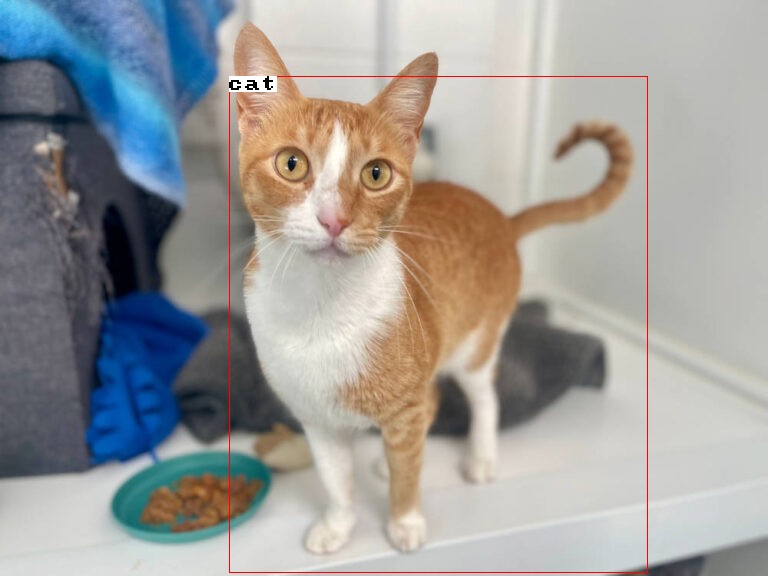
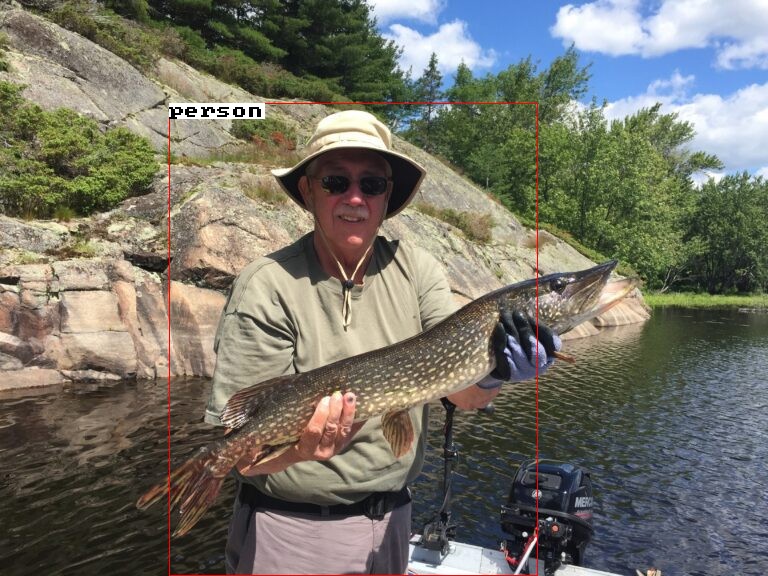
model.Predict(inputImages, opts, outputImages, true);

// Step 4: Save each image.
std::vector<std::string> outputFiles = {"1.jpg", "2.jpg", "3.jpg"};
mlpack::Save(outputFiles, outputImages, opts);
🔗 Advanced Functionality: Template Parameters
The YOLOv3 and YOLOv3Tiny classes also support using different element types to represent weights and predictions.
The full signature of YOLOv3 is
YOLOv3<MatType>
MatType: specifies the type of matrix used for learning and internal representation of weights and biases. The default isarma::mat.- Any matrix type that implements the Armadillo API can be used.
The example below uses YOLOv3 using the arma::fmat weights.
NOTE: You must define the MLPACK_ENABLE_ANN_SERIALIZATION_FMAT macro
to serialize and deserialize models that use arma::fmat as the data type.
// Step 1: load the pretrained arma::fmat weights.
// Download: https://models.mlpack.org/yolo/yolov3-320-coco-f32.bin
mlpack::YOLOv3<arma::fmat> model;
mlpack::Load("yolov3-320-coco-f32.bin", model);

// Step 2: load the image into an arma::fmat.
// Download: https://models.mlpack.org/yolo/dog.jpg
// Note: the image type must also be `arma::fmat`
arma::fmat image, outputImage;
mlpack::ImageOptions opts;
mlpack::Load("dog.jpg", image, opts);

// Step 3: Preprocess the input image, detect bounding boxes and
// draw them onto `outputImage`.
model.Predict(image, opts, outputImage, true);

// Step 4: Save to "output.jpg".
mlpack::Save("output.jpg", outputImage, opts, true);
Since YOLOv3Tiny has an identical API, we can use the arma::fmat
weights for faster inference times.
// Download: https://models.mlpack.org/yolo/yolov3-tiny-416-coco-f32.bin
mlpack::YOLOv3Tiny<arma::fmat> model;
mlpack::Load("yolov3-tiny-416-coco-f32.bin", model);